Entra Useless Insights Report
Overview
Yes. The name is snarky on purpose.
With the drive to using phishing-resistant MFA something on the mind of many organizations, I’ve been taking a look at the Usage & Insights Report features in Entra, specifically the Authentication methods activity report.
Enumerating the type of authentication methods registered on a user, on a per-user basis, can be time consuming, and would become untenable in extremely large organizations.
Authentication methods activity reporting to the rescue – right? Not so much.
In digging into the report, whether it’s through the Entra admin center or through Microsoft Graph PowerShell SDK, the data reported through this is just astoundingly awful if you want to try and build some basic measurements around who is actually registered for passkeys (FIDO2); I haven’t looked to see if it’s as awful with other methods.
Luckily in the tenant I’m examining, there are only a few hundred user objects, so it’s also feasible to enumerate each user the long way, which I’ll cover below as the workaround. I’ve posed a complaint to Microsoft in some channels and have yet to hear anything back, other than similar experiences from a few others.
The Problem
I’m focused on finding users registered for passkeys in Entra, and by passkeys I mean using the Microsoft Authenticator App on either Android or iOS devices.
The behavior I’m seeing has been problematic over the last month, but I suspect the report has been broken for quite some time.
In this instance, I go into the Usage & Insights reports, Authentication methods, and filter by Method: Passkey (Microsoft Authenticator), and I see the following:
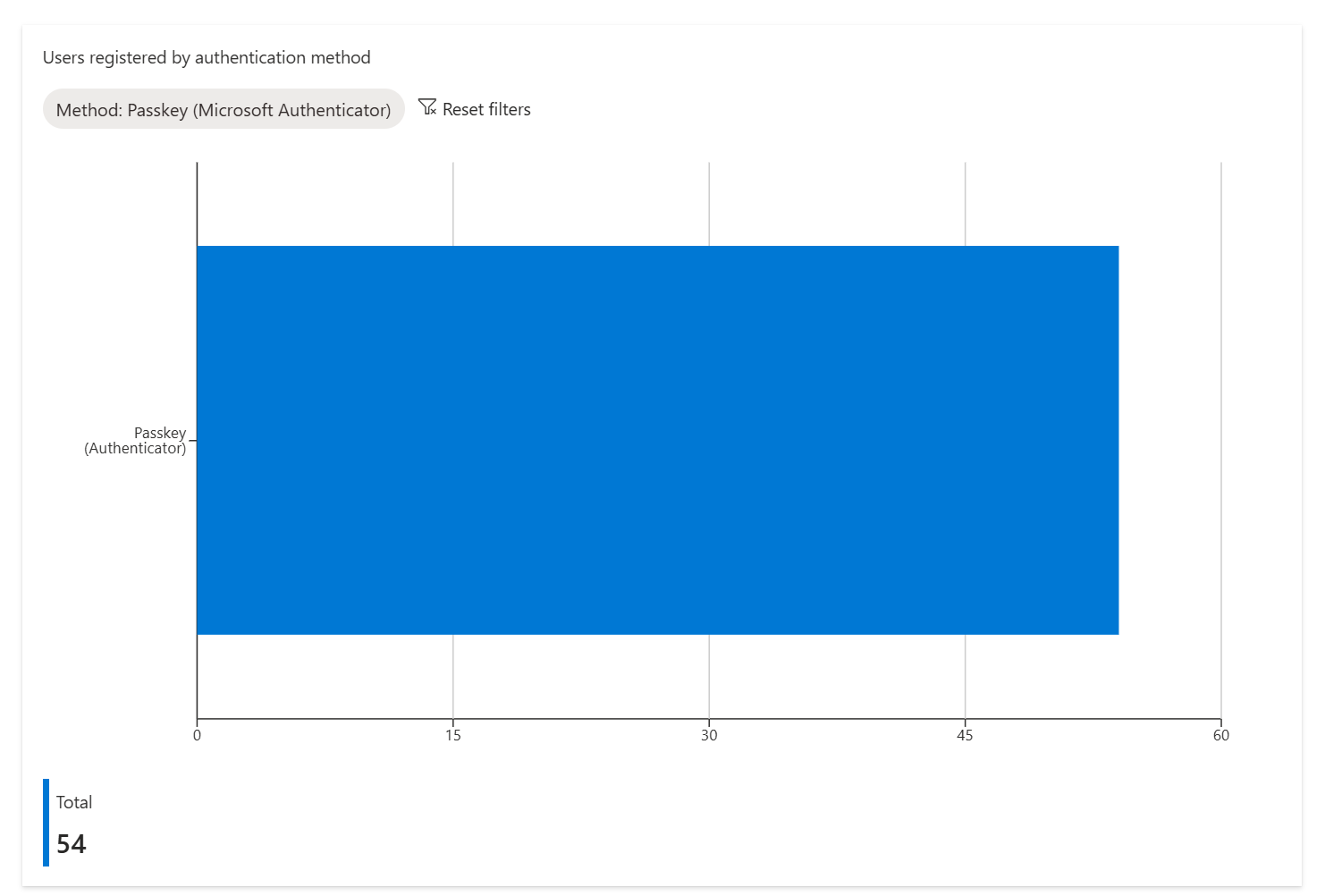
But based on what I know, that seems way off, so I decide to run a Graph PowerShell SDK command and get the same results:
(Get-MgReportAuthenticationMethodUserRegistrationDetail `
 -Filter "methodsRegistered/any(x:x eq 'passKeyDeviceBoundAuthenticator')" `
 | Select-Object -Property UserPrincipalName).count
54
Note that in Graph passkeyDeviceBoundAuthenticator is what differentiates this from just passkeyDeviceBound, which would include FIDO2 security keys.
Back to the point, this number is low, and it’s been historically low. One thing that I find interesting, and while I’m redacting the actual data, is when I run:
Get-MgReportAuthenticationMethodUserRegistrationDetail `
 -Filter "methodsRegistered/any(x:x eq 'passKeyDeviceBoundAuthenticator')"
and examine the LastUpdatedDateTime value, for most of the users it’s showing a date that is about a week old. I know that Usage & Insights reports are not real-time; trying to think back to my Microsoft days, in my head the delay I thought was roughly two hours. But there are other issues – a user who has registered for a passkey back in Feburary 2025 is missing from the report. If the report never does anything to reconcile itself, it’s of zero value.
To spot check this user I run:
Get-MgReportAuthenticationMethodUserRegistrationDetail `
 -Filter "methodsRegistered/any(x:x eq 'passKeyDeviceBoundAuthenticator')" `
 | Select-Object -Property UserPrincipalName,LastUpdatedDateTime `
 | Where-Object {$_.UserPrincipalName -eq "user@domain.com"}
I went to check the Microsoft docs here, Usage and insights report – Microsoft Entra ID | Microsoft Learn, to see if there is any details around the frequency this runs or known issues, but found nothing.
The Workaround
So, it’s back to doing essentially what the report should do, which is enumerate all users within Entra.
Of course, Microsoft specifically recommends that you don’t do this in the docs, Microsoft Entra authentication methods API overview – Microsoft Graph v1.0 | Microsoft Learn, where they state:
We don’t recommend using the authentication methods APIs for scenarios where you need to iterate over your entire user population for auditing or security check purposes. For these types of scenarios, we recommend using the authentication method registration and usage reporting APIs (available on the beta endpoint only).
registration and usage reporting APIs (available on the beta endpoint only).
The code I slapped together is a mix of my brain and some vibe coding, it ended up looking like the following, with a bit of parralel processing thrown in:
# Authenticator App AAGUIDS
$targetAAGUIDs = @(
    '90a3ccdf-635c-4729-a248-9b709135078f',
    'de1e552d-db1d-4423-a619-566b625cdc84'
)

# Grab all users
#$AllEmployees = Get-MgBetaUser -All -Filter "userType eq 'Member'" -Property Id,UserPrincipalName

# Run up to 10 employees in parallel
$PasskeysRegistered =
    $AllEmployees |
    ForEach-Object -Parallel {

        $emp = $_

        $fidos = Get-MgBetaUserAuthenticationFido2Method -UserId $emp.Id -All -ErrorAction SilentlyContinue |
                 Where-Object { $_.AaGuid -in $using:targetAAGUIDs }

        foreach ($key in $fidos) {
            [pscustomobject]@{
                UserPrincipalName       = $emp.UserPrincipalName
                ObjectId     = $emp.Id
                Passkey      = $key.Model
                RegisteredOn = $key.CreatedDateTime
            }
        }
    } -ThrottleLimit 10

$PasskeysRegistered
And then if I run a count, and ensure I’m focused on unique users, since the results could have multiple entries for some users:
Further, if I go search for my missing user, sure enough they are there:
$PasskeysRegistered | Where-Object {$_.UserID -eq "user@domain.com"}

UserID              ObjectId                             Passkey                       RegisteredOn
------              --------                             -------                       ------------
user@domain.com     xxxxx                                Microsoft Authenticator - iOS 2/27/2025 10:23:40 PM
As a side not the problem, one could theorize something was broken around that time in Entra, and hence the user somehow fell off the report. But I can actually find another user on the report who registered within twenty minutes of the missing user 🤔.
The Takeaway
Don’t trust Usage & Insights reports for passkey reporting. Hopefully this post can become irrelevant down the road.